
Minimalist Email · Native to the Mac
Email can feel calm again.
A beautiful, focused place to read and write email.
Coming Soon for macOS
Explore the features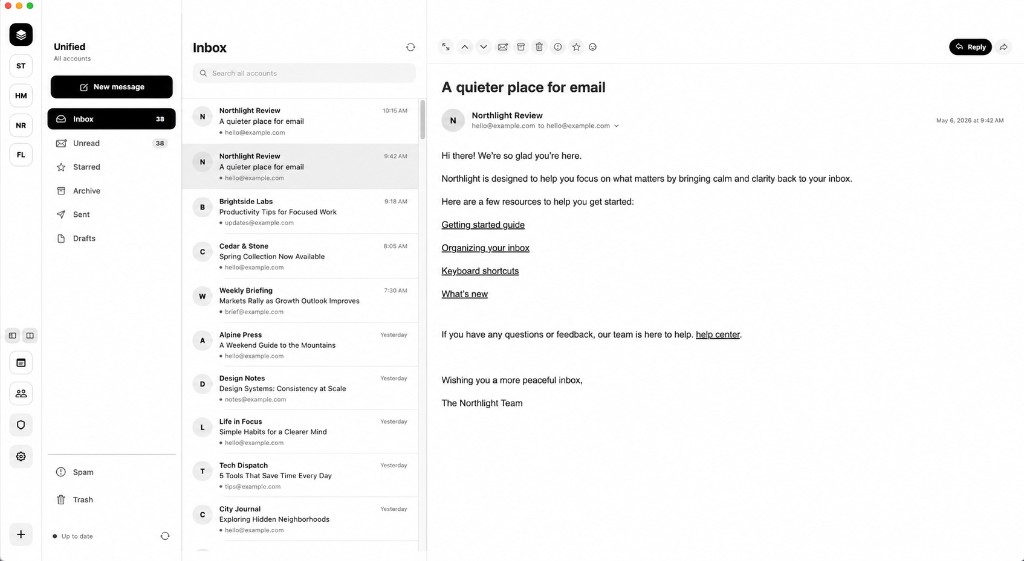
A quiet reading and writing space.
Minimalist Email is a native macOS email client with a focused, understated interface and the essential tools of everyday communication. It is for people who want their inbox to feel like a calm place to read and write.
The work of mail stays close at hand. The rest of the interface stays still.
Your email stays yours.
Minimalist Email connects directly to your email provider through secure SSL/TLS connections, so you reach the mailbox you already have.
- Passwords remain in macOS Keychain.
- Clean and Balanced block remote images. A message can be read on its own terms.
- Scripts, forms, frames, and pop-ups remain disabled in every reading mode.
- Notes, contacts, preferences, and message caches remain local on your Mac.
Made for reading.
Minimalist Email gives messages room to breathe. Personal correspondence remains clear and direct, while visually rich newsletters can unfold in a generous editorial canvas. It is a newsletter reader for macOS as much as it is a place for ordinary mail.
Three reading modes let you choose the experience that feels right, while safety restrictions remain in place.
- Clean Readable linked text with remote content blocked.
- Balanced Safe formatting is preserved while remote images stay blocked.
- Original The sender’s design and remote images are displayed. Scripts, forms, frames, and pop-ups stay disabled.
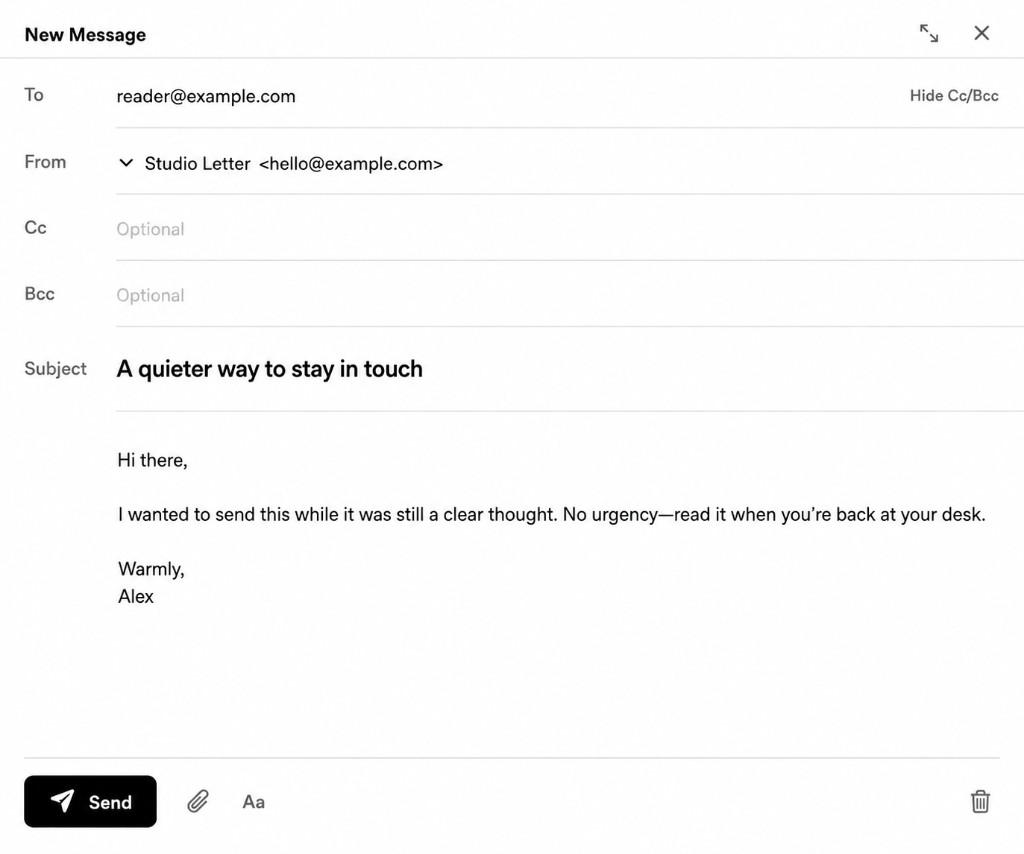
A calm place to write.
Write in a spacious canvas with automatic draft saving, attachments, recipient suggestions, account signatures, formatting tools, and an optional focused composition mode.
Essential capability, kept in order.
This is a native macOS email client. The work of mail is close at hand, and the rest of the interface stays still.
- A calm native macOS experience
- Beautiful reading for messages and newsletters
- Focused, spacious writing
- Multiple accounts in one Unified Inbox
- Privacy controls that remain understandable
- Fast local caching and background preparation
Complete feature inventory
Mailbox
- Native macOS interface
- Unified Inbox for multiple accounts
- Individual account and folder views
- Inbox, Unread, Starred, Archive, Sent, Drafts, Spam, and Trash
- Support for custom IMAP folders
- Reorderable accounts with optional custom account icons
Connections
- Secure standard IMAP and SMTP support
- Quick setup for Purelymail, SpaceMail, and Hostinger Email
- Adjustable automatic mail checking
- Optional new-mail sounds
- Background message preloading and local caching for responsiveness
Reading and writing
- Conversation grouping
- Reader navigation with buttons or J and K shortcuts
- Reply, Reply All, Forward, Archive, Star, Spam, Trash, and folder actions
- One-click unsubscribe when the sender provides it
- Automatic draft saving
- Attachments, signatures, rich formatting, and recipient suggestions
- Optional focused reading and writing modes
On your Mac
- Smooth, persistent pane resizing
- Local Notes for selected passages, links, and ideas
- Local Contacts with CSV import
- Minimal theme, with Terminal as an optional alternate appearance
Compatible email providers are those that offer secure IMAP and SMTP access. Local caching keeps recent mail feeling immediate.
Your inbox, arranged your way.
Reorder connected accounts, assign a custom account image, resize the mailbox and reading panes, and hide panels when more room is needed. Optional focused reading keeps the message in front and the rest of the window still.
And a few surprises for those who like to explore.
Terminal is an optional alternate theme for people who want a darker, more distinctive workspace. Switch back to the light Minimal theme whenever you like.
Questions, answered plainly.
What is Minimalist Email?
Minimalist Email is a native email client for macOS designed around calm reading, focused writing, multiple email accounts, and a clean interface.
Which email providers does it support?
Minimalist Email works with compatible email providers that offer secure IMAP and SMTP access. It includes quick settings for Purelymail, SpaceMail, and Hostinger Email.
Is Minimalist Email available now?
Not yet. Minimalist Email is coming soon for macOS.
Does Minimalist Email store my password?
Passwords are stored securely in the macOS Keychain.
Does it support multiple email accounts?
Yes. Users can view accounts individually or together through a Unified Inbox.
Is there a Windows or mobile version?
Minimalist Email is currently being developed for macOS.
A quieter place for your email.
Minimalist Email brings thoughtful reading, focused writing, privacy controls, and essential mailbox organization together in one native macOS application.
Coming Soon for macOS
Questions? Email hello@minimalistemail.com.
Built with care by Worldbender Studios.